Showing posts with label dreamcast. Show all posts

Tuesday, 6 June 2017

Gotchas When Porting C++ and OpenGL Applications to the Dreamcast

Over the past month or so I've been steadily working on porting my game engine Simulant to the Dreamcast. While it's not quite ready for prime-time, I did discover a lot of road-bumps along the way, and I thought I should write some of them down so that anyone else porting to the Dreamcast will at least have some results on Google to look at!

Compile the Dreamcast SDK with GCC 4.x

It didn't take very long to compile my code, but when it came to linking all kinds of trouble awaited me. Whenever I tried to link, most of the C++ symbols (things like string and vector) were missing. After several days trying different linker flags I decided the problem must be with the SDK itself. A quick `nm` of libstdc++.a showed up the problem; only a handful of symbols were in there!

I've been using a Docker container to compile my code, which is fortunate because it allowed me to gradually roll back the Fedora version until I hit one that correctly compiled libstdc++. Fedora 21 is where it worked!

The moral of the story is that for some reason, GCC 5.x and above will not correctly compile libstdc++.a from GCC 4.x - so if you're compiling the SDK for C++ code, you're going to need to use an old GCC version.

Don't rely on std::atomic or std::async

The SH4 CPU only has a single limited atomic instruction which rules out support for std::atomic. That by itself wouldn't be so bad, but it turns out that even though the standard defines that std::async can be implemented without atomics, GCC hasn't done that.

In most cases it's trivial enough to build what you need using std::mutex and std::thread - but it is a bit of a hassle.

std::chrono::high_resolution_clock ... er... isn't

This had me confused for a while. I had a sample GL application running; a spinning cube, and it would run at a consistent 1FPS. I know the DC is slow compared to modern machines, but, 1FPS for a cube?!

Turns out that the "high resolution" timer had an accuracy of 1 second! Using the built-in KallistiOS timer functions fixed it.

libGL is still a WIP

The GL port for the DC is a great little library, but it has some rough edges. I recommend that you get your application runnable on both your PC and the DC and focus on targetting GL 1.1. If the graphics in your application don't work on the Dreamcast but do on the PC then investigate and submit a patch!

Saturday, 14 May 2016

DreamPi 1.4 Released

This is a bug fix release.

  • New image. Fixes corruption issues with the previous release.
  • Improved Pi 3 support. This release is tested to work with the Pi 3.
  • Updated firmware. Includes the latest Raspbian updates (Linux kernel 4.4)
  • Improved IP allocation. This code has been completely rewritten to use the arping command and seems much more reliable and fixes several known issues.
You can download the release here.

Saturday, 16 April 2016

Being Spread Too Thin

It's come to my attention that I have way too many projects on the go. This post is going to summarize what needs to be done to each of them in a kind of semi-apology for why things you are waiting for might take a while...

It's also worth remembering I can only work on some of these projects in certain locations. DreamPi stuff must happen at home where I have a Dreamcast and a DreamPi set up. Electronics stuff needs to happen near electronics kit, SDL 2 needs a PC with a Dreamcast emulator, access to a Dreamcast and KallisitiOS which I only have at home. Most of my computer time happens on the train, so... yeah.

DreamPi


The DreamPi software image has been a huge success. pcwzrd13 of Dreamcast Live recently reported the most active online Dreamcast game session ever as a result of more people getting their Dreamcast connected. Even though the software works, here's a list of things that are still left to do:
  • Better IP address allocation, what is there now is incredibly buggy
  • Cutting down the image, and swapping the init system for systemd then writing a proper systemd service file
  • Detecting modem hotplugging and handling it gracefully
  • Hanging up and reconnecting every 5 minutes or so when generating the dial-tone to workaround the modem apparently going to sleep
  • Speeding up the connection process by removing excess AT commands
  • Upgrading the image to support the Pi 3
  • Coming up with a way to easily configure Wifi dongles


Dreamcast Now 


Connected, but separate, Dreamcast Now has become a useful tool, here are the things I'd like to fix:
  • Add more game domain hashes (e.g. Toy Racer)
  • Add Dreamcast Live and Dreamcast-talk versions of the listing so that those sites can iframe them in

DC-Pheonix (DreamArena)


This is working amazingly well considering I hammered it out in a few hours. Still left to do though:

  • Add Quake 3 PAL support
  • Add a clone of the DreamArena registration site so users can register with DreamKey 1.0
  • Database-backed user registration so that the entire process works as it did back in the day

Serial Connector / Link Cable 


I'd like to design and manufacture these, but this is on hold until I have some line voltage inducers made. The whole process for making a PCB is pretty time consuming so don't expect this stuff soon!


Line Voltage Adapters


I have 3 prototype PCBs. I need to manually hot-plate solder the components, and then 3D print cases for them. At that point I can decide whether I have the time to sell them and whether it's worth it. This can only be done when I'm at my work's electronics club which unfortunately I can only make occasionally. Don't expect these any time soon either :(

Also, I need to fix some bugs in Fritzing (the PCB software) to make these PCBs export correctly without me manually fixing up the Gerber export files.


Dreamcast SDL 2 Port


This is about 70% done. It needs testing and fixing. I'll get around to this when I start porting my game engine to the Dreamcast....


My Game Engine (KGLT)


This is the main project I really want to focus on. Here's what I intend to do:
  • Improve rendering performance
  • Fix Quake 2 BSP lightmap loading
  • Add an OpenGL 1.x renderer for Dreamcast support
  • Port to the Dreamcast
  • Write a game for the Dreamcast

As you can see, I have a lot going on, and that's ignoring all the support requests / questions I get about the Dreampi and all the other things I'm helping individuals with. It also ignores the non-Dreamcast related stuff that I already have out there.

So, if you are waiting for something, I apologise, but all of my code is open source, I'd appreciate the help if you can contribute!

Thursday, 7 April 2016

Toy Racer Back Online for Everyone!

I'm excited to announce that an experimental replacement server for Dreamarena is now online and as a result, Toy Racer is back online for everyone, even if you don't have a BBA!

DreamPi users have this support right now, just try it! Anyone else on dial-up will need to point their DNS at 46.101.91.123 to use the new server.

As I said, this server is HIGHLY EXPERIMENTAL. It will likely crash, not work, behave weirdly etc. the server will keep improving as I gain more understanding of the authentication protocol.

Quake 3 PAL doesn't work at the moment, but that support is coming soon too!

Special thanks go to Jonas Karlsson who did the hard job of deciphering the protocol!

Saturday, 30 January 2016

Setting up KallistiOS on Fedora

KallistiOS (or KOS for short) is the open source SDK for Dreamcast development. It can be a little tricky to understand the installation process so I'm just explaining it here, this is more for my own benefit than anything.

There are instructions for configuring KallisitiOS on the website, but they are focused on installing globally in /opt/ whereas I'm going to explain how to setup KOS in your home folder.

Friday, 29 January 2016

An Update on those Line Voltage Inducer Cables

I mentioned on the Dreamcast Junkyard Podcast that I was intending to build and sell some special phone cables which add the required voltage for a Dreamcast to connect with a DreamPi setup - official DreamPi cables if you will. At the time I was waiting for a test run of PCBs to arrive, and they have!

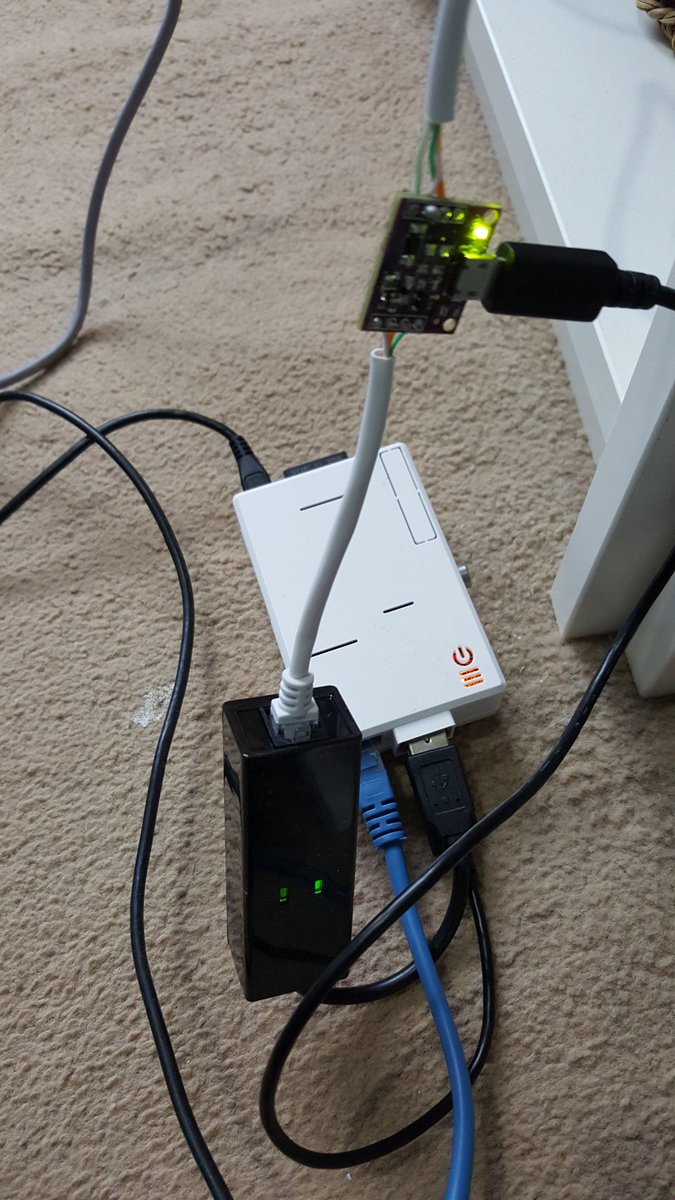
There are some minor issues with this PCB revision, but I have a working cable, here it is in all its glory:


As you can see, the power comes directly from the Raspberry Pi itself providing you have a spare USB socket. I've been forced to test this by playing PSO online for an hour, and I can confirm that the circuit works perfectly!

So straight onto manufacturing right? Well.. not quite.

Firstly, obviously I don't intend to sell cables with exposed circuitry, so before I sell any cables I need to get some boxes 3D printed. But more importantly, I think I can do better than this.

I think it should be possible to create an adapter box that plugs directly into the Dreamcast, leaving you to just connect any standard modem cable. Not only will this be more robust, but also be quicker and cheaper for me to manufacture (the cable costs £3-4 alone for a decent one).

The next revision of boards I send off will probably an attempt at this, and as end-to-end design, manufacture, shipping, soldering and testing takes about 3 weeks, I'm afraid I won't be shipping these for a little while.

Still, I've proven that it works, and this is a thing I can build. I'll keep you all updated!

P.S. This has all only been possible because of the electrical know-how of my mate Rob!

Monday, 25 January 2016

DreamPi 1.2 Released!

This is a bug fix release:

  • Pi to Modem communication now uses a fixed-baud speed. This will hopefully fix some issues that people were having sending commands to the modem but I'm not sure.
  • Earlier disconnection. The software now disconnects from the modem as soon as the handover to PPP is complete, this should allow for a faster disconnect/reconnect cycle when you finish a game and avoid the DreamPi software interfering with PPP.
  • More reliable startup. Occasionally there was an error on startup while detecting the modem. Now this will be caught and will fall back to ttyACM0 rather than crashing. A better fix would be to wait until the modem is ready - this will happen in a later release.
You can download the new release here.

Thursday, 21 January 2016

DreamPi 1.1 with Dreamcast Now! Released

I'm happy to announce that version 1.1 of the DreamPi software image is now available. This release introduces the Dreamcast Now! service (as discussed here) and also lays the foundations for a web-based configuration system.

As this release introduces some new features, this is probably a more unstable release than 1.0. 

Once you have the new image up and running on your Raspberry Pi, you should head over to http://dreamcast.online/now/configure/ to configure the Dreamcast Now! service.

This release also includes updated firmware for the Raspberry Pi and so it should now run on the PiZero.

Keep an eye on this blog for more updates! Lots more exciting things in the works!

Download the new release here!

Tuesday, 5 January 2016

Announcing Dreamcast Now!

I'm excited to announce a new feature of the DreamPi software which will be coming in the unstable 1.1 release!

Dreamcast Now! is a new service which allows players to see which and how many DreamPi users are online, and also what they are playing. You can preview the Dreamcast Now! service at the rather spectacular URL: dreamcast.online/now/

It looks something like this (on mobile):


But there's more! I'm working closely with the dreampipe.net team to provide a level of integration with their site which will allow you to see who's online without ever leaving the confines of the Dreamcast.

I'll also be providing user-specific URLs for widgets that can be embedded in forum signatures to show when you are online.

I hope to release this over the next couple of weeks, a few select testers will be receiving test DreamPi images over the next few days so keep an eye on the page for online gamers!

How does it work (technical stuff ahead)?


It's all just a little bit clever. On boot a unique identifier is generated from your Raspberry Pi, this is your secret key which allows the service to know which DreamPi is online. When you connect to an online game, the DreamPi sends a message to the Dreamcast Now! service indicating that the user with that unique identifier came online. This is all pretty much anonymous, the whole communication happens securely over SSL and the only thing that is sent is the Pi's unique ID.

Once the game is connected, the first thing it will do is perform a DNS lookup for the game's server. The DreamPi software watches for the domain query, creates a non-reversable hash of the domain (using SHA256) and sends this to the server. Again, this is all over SSL and the server has no way of knowing what the domain was unless it happens to match one of the game domain hashes we have on the server. These domain hashes are never stored.

This is how the server detects when a DreamPi comes online and what game is being played.


What about usernames and profile images?


These are entirely optional. If you don't do anything you'll get an auto-generated username (e.g. Unnamed_12345) and just a default profile image will be shown. However it will be possible to browse to the DreamPi's IP address in your browser (e.g. dreampi.local) and enter a username, and a Gravatar email. The email is MD5 hashed before being sent to the server, the only data sent to the server that isn't just a hash value is the username. Usernames are not permanent, you "lease" them. They are associated with your DreamPi's unique ID but if you fail to go online for 30 days then they are free to be associated with another DreamPi. This is necessary so that if your DreamPi breaks, you'll be able to regain your username after 30 days by associating it with another DreamPi.


I don't like the sound of this, can I disable it?


Yes. It can be switched off from the same page you configure your username. It will be enabled by default though.

Wednesday, 23 December 2015

DreamPi 1.0 Released!

A few years ago I purchased a cheap USB modem with the idea of building a "PC/DC server" and connecting my Dreamcast to the Internet. When it arrived I couldn't find the time (and didn't have the skill) to build the required line voltage inducer, so the modem sat in a drawer untouched.

Later, the Raspberry Pi was released, and I bought one. I figured it was time to finally build that PC/DC server! But alas, like most Raspberry Pi purchases it ended up in the drawer alongside the USB modem, like pieces of an incomplete jigsaw puzzle.

Fast-forward to 5 months ago. Since buying the modem my electronics skills had improved considerably so I finally built that line voltage inducer, and tried to configure the PC/DC server with the Raspberry Pi. It didn't work. I tried everything! Different resistors, different batteries (up to 12V) , I rebuilt the line voltage inducer twice. It still didn't work.

Then someone on a forum said it seemed like there wasn't enough voltage. I couldn't understand that - all the tutorials had said 9V was plenty, I was using 12! One day I got reckless and connected two 9V batteries rather than one, and straight away Phantasy Star Online connected! It was at that point that I realized that I'd never actually seen anyone with a PAL Dreamcast manage to get a PC/DC server working, I'd seen plenty of people with PAL Dreamcasts complaining it didn't work however. This was the mystery solved! PAL Dreamcasts need more voltage than the U.S. counterparts.

At this point connecting was a pain. I had to connect to the Pi, launch a program, and then dial on the Dreamcast, then answer manually on the Pi. "Surely there's a better way", I thought.

It occurred to me that the USB modem could "listen" for the Dreamcast dialling. If it could then I wouldn't need to answer manually, I could write some code for that. I opened up my editor and started learning HAYES commands to talk to the modem. I put it online and waited until the Dreamcast dialled, and then answered. Success! After making sure that I could repeat the process automatically I pushed out a release of the DreamPi image. People were happy, but there were still problems...

Most games look for a dial tone before they will try to connect to a remote server. Obviously there is no dial tone when you've just connected one modem to another. While browsing for information I discovered that someone had built an interesting solution by connecting the line-out of a computer to the phone line, and played a recording of a dial tone into the line until the Dreamcast dialled. Then there was another "eureka!" moment. I already had the line open while I was listening for the Dreamcast to dial numbers, I could definitely play the sound of a dial tone through the modem at the same time.

It took a lot of fiddling to find the right set of HAYES commands, but eventually I succeeded. Now all Dreamcast games would work! It took several more bug fixes and releases to get to where we are today. But here we are at version 1.0.

So, today I'm announcing 1.0. This release extends the timeout for waiting for command responses, and doesn't echo our commands back to the modem which was confusing things.

There is still more to be done. I'm not happy with the IP address allocation, and WiFi support has always been on the list. But I'm happy to call this release complete. You can now play your Dreamcast games online with nothing more than a USB modem, a Raspberry Pi and a simple electrical circuit.

My next challenge is to get a Dream Arena authentication server running. At that point the last remaining games (Toy Racer and PAL Q3 Arena) will work and the DreamPi will allow playing every online game that still has servers.

Merry Christmas everyone!


Wednesday, 16 December 2015

DreamPi 0.99 Released

This is a major bug fix release.

  • Switched to using "arp -n" rather than "arp-scan". This command was used to detect IPs in use but would cause the DreamPi to hang sometimes. Hopefully this will go away now.
  • New upstream DNS server. The internal DNS server has had all its rules removed except for one pointing to a new hosted DNS server. This means that the DreamPi retains the DNS caching and allows overriding but configuration changes can be made without pushing a new release.
  • Better command sending. The serial modem communication no longer echoes back the commands it's sent. Hopefully this will fix the problems with command responses not being recognized.
You can download the new release here.

Sunday, 6 December 2015

DreamPi 0.98 Released!

This is a bug-fix release:

  • More reliable modem command sending. Some modems insert a newline character occasionally midway through a response. This was causing the software to get stuck in an infinite loop. This should now be fixed.
  • Faster Starlancer connecting. Starlancer attempts a reverse DNS lookup several times during connection, this PTR record doesn't exist and so it eventually times out. The DNS server built into the DreamPi now responds to this reverse DNS lookup immediately making the connection happen instantly. See video below!


Download the new release here.

Sunday, 29 November 2015

DreamPi 0.97 Released!

 This release is a major release!

  • Near complete rewrite. The code is now much cleaner
  • Fewer modem commands used. Fewer commands == fewer places to go wrong!
  • Starlancer now supported! Starlancer now works with 100% connection success rate!
Download it here!

Saturday, 28 November 2015

DreamPi 0.96 released!

This version is a minor release:

  • IP address autoconfiguration. The DreamPi now tries to use IP addresses .98 (for the Dreamcast) and .99 (for the Pi). If these IP addresses are taken it adjusts downwards to find the next available IPs.
  • DNS now available to other machines. For testing the DNS server is now accessible by any machine on the network, not just the Dreamcast.
Download the new release here!

Thursday, 26 November 2015

DreamPi 0.95 Released

This is a bug fix release:

  • Pi <> Modem communication now happens at a constant safe baud rate
  • The PPP peers file is now configured with the max speed of the modem, this increases performance and hopefully fixes connection issues that some people were having during PPP negotiation
  • The Starlancer DNS is now configured in the dnsmasq configuration directly rather than hitting an upstream nameserver. This should hopefully fix DNS issues
Go download here!

Monday, 23 November 2015

DreamPi 0.94 Released

This is a minor bug fix release:
  • Fixed a bug in the DNS configuration
  • Cleaned up the log output
  • Added a pause before answering to hopefully make things more reliable

Friday, 7 August 2015

SEGA Won't Build a Dreamcast 2. But Could We?

The SEGA Dreamcast was an iconic console. To many, it is regarded as the greatest console that has ever been released. Since its untimely demise many fans have hoped that SEGA would re-enter the hardware industry and release a Dreamcast 2 - an updated but truely backwards-compatible successor to the original hardware.

This is very unlikely to happen. Consoles are expensive, if SEGA did re-enter the game and it was a failure (which is pretty likely) it would probably kill SEGA entirely.
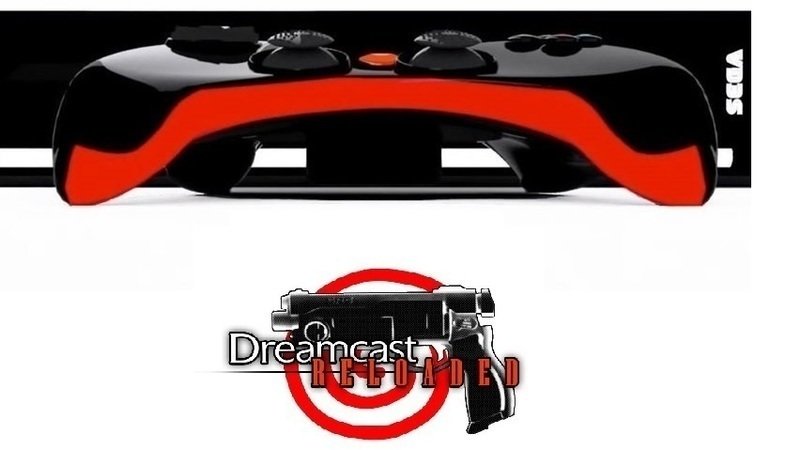
Image from the Dreamcast 2 Petition on Change.org by Ben Plato


There is however a petition online to design a Dreamcast 2 which would be built-to-order, nullifying much of the risk. This actually isn't a terrible idea. Designing an updated version of the original Dreamcast, with perhaps even the same specifications but with modern connections (LAN vs Dial-up, HDMI vs VGA, HDD vs VMU) probably could be done by a small internal team. The very people interested in this kind of hardware would be willing to pay above the cost of manufacture to own it. SEGA could make a profit on the hardware, and as suggested in the petition, provide an online store for purchasing digital versions of the classic games that already exist. If they opened that store up to indies then that would be a bonus.

But still, this is very unlikely to happen. SEGA is primarily a software company now, and most of the team that designed the Dreamcast probably moved on long ago. But that doesn't necessarily mean a Dreamcast 2 couldn't be built. The tools needed for a dedicated community to build a Dreamcast clone (let's call it OpenDC) aren't that far way.


Patents are Expiring


The Dreamcast was released at the tail end of 1998. Given that patents only last 20 years in most countries, and that most of the Dreamcast patents (e.g. for the GD-ROM) were patented in 1997, the Dreamcast will essentially be free to clone in a couple of years.

There's even better news though. The SH4 CPU which the Dreamcast uses will no longer be patented in 2016 and the Open Processor Foundation is already working on their own version. It's not unlikely that at some point in the next 3-4 years there will be a "J4" system-on-a-chip (SOC) available, it's also probable that any SH4-clone SOC will be higher spec'd than the Dreamcast was, with some kind of OpenGL ES based GPU built in.

If an SH4 based SOC was released, the rest of the problems to solve involve software, peripherals and packaging.

Software


On the software front, we have a bit of a head start. Linux is free, open source and supports the SH4 architecture. The community would need to build a Linux based OS with a basic graphical launcher, and provide any libraries which the Dreamcast executables call into. It's a fair amount of work, but there shouldn't be anything impossible here.

We also already have a free fully featured Dreamcast SDK in KallistiOS, and new games are being released based on it even now. This means that the community could provide an online store for new homebrew games written for the new console. This could be accessed through the OpenDC launcher and download games directly to disk.

Peripherals


The biggest issue on the peripheral side is the GD-ROM. This will either have to be custom made when the patents expire, or alternatively, the community would need to develop new firmware for an existing CD-ROM model. Another option would be to forgo the GD-ROM drive entirely, but that wouldn't really fulfil the backwards compatibility that everyone would like.

The dial-up modem could be emulated in software. This just leaves the controllers. With 3D printing really taking off now, it's quite probable that over the next few years it will be possible to print electrical connections into plastic. When that happens, 3D printing a case for the console, complete with Dreamcast compatible controller ports would simply just be a case of sending a design to Shapeways.

If using old Dreamcast controllers isn't enough, a custom community-designed controller could be made using 3D printing and software like Fritzing.

The Dream is Still Alive!


So, even though SEGA may never release another console, a driven and dedicated community following open source practices could build another Dreamcast. We might just have to wait a few more years to see it.